

vLLM on the DGX Spark: Architecture, Configuration, and Local Evaluation
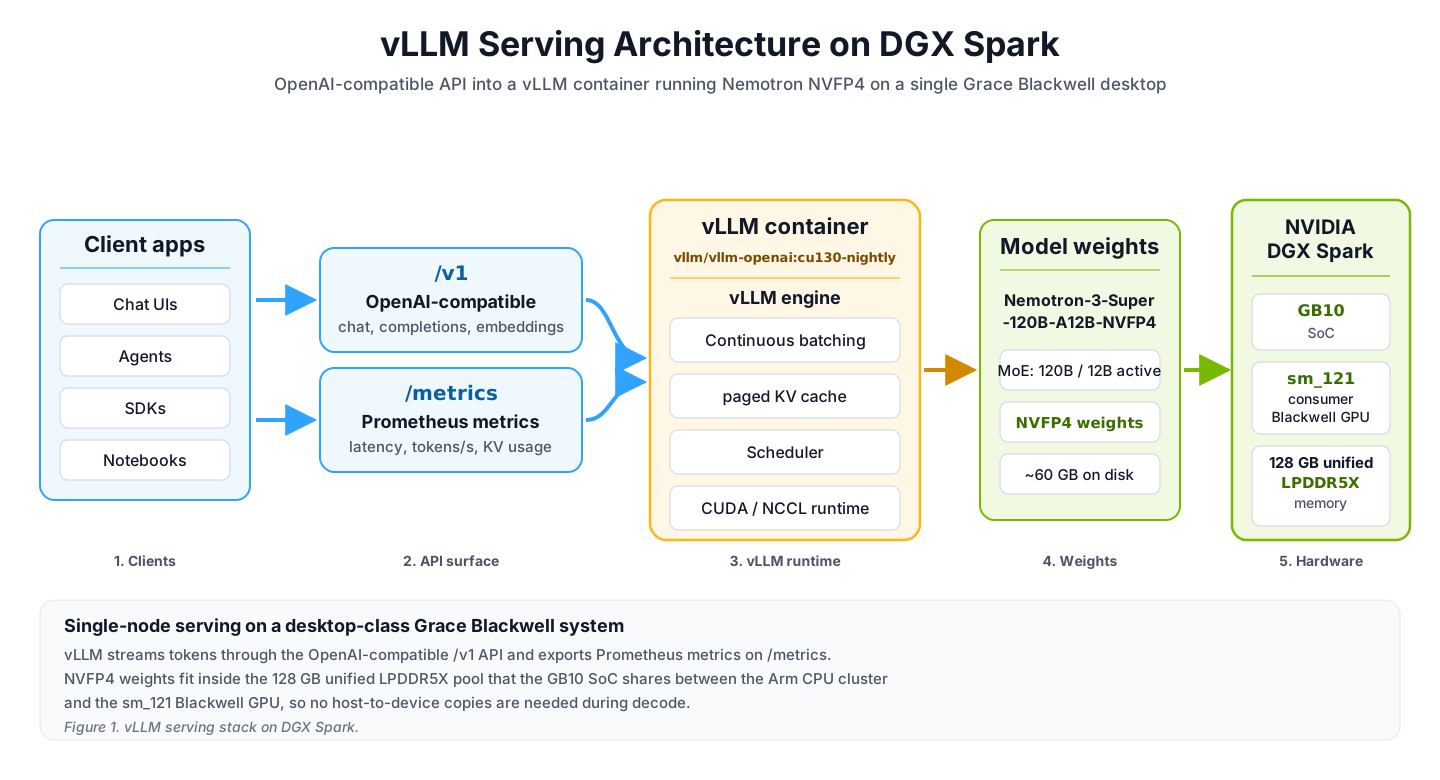
NVIDIA DGX Spark is a desk-side GB10 system for running large model inference locally, bridging the gap between laptop-scale development and data center GPU serving. vLLM provides a fast, efficient local inference endpoint on DGX Spark: it pairs an OpenAI-compatible API with the memory, batching, KV-cache, and telemetry controls needed to run large NVFP4 models locally. This post explains how vLLM maps onto the DGX Spark architecture: model selection, runtime flags, unified-memory behavior, OpenAI-compatible serving, Prometheus telemetry, and local evaluation results from a Nemotron-3-Super deployment.
Technical summary
- vLLM provides a fast, efficient local inference endpoint on DGX Spark. It pairs an OpenAI-compatible API with the memory, batching, KV-cache, and telemetry controls needed to run large NVFP4 models locally. The current Nemotron-3-Super DGX Spark recipe uses vLLM's official OpenAI-compatible server image with DGX Spark-specific runtime flags, giving developers a tested path from model download to local serving.
- DGX Spark architecture shapes the serving configuration.
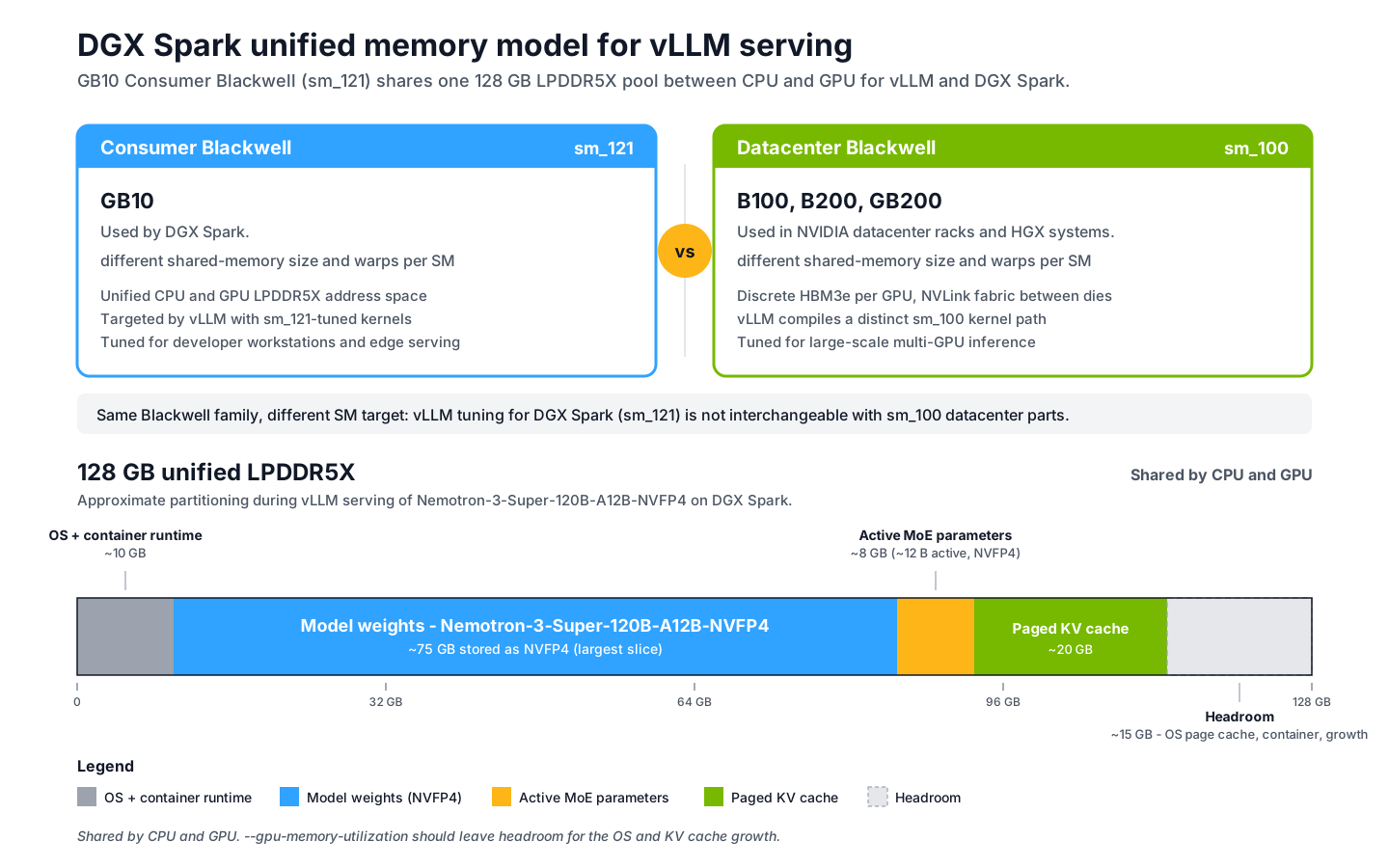
sm_121consumer Blackwell silicon, a unified CPU and GPU memory pool, and Spark's memory bandwidth make continuous batching, paged KV cache, NVFP4 kernels, and Prometheus telemetry especially relevant. - vLLM runtime flags should match DGX Spark's unified-memory profile. Spark's CPU, GPU, operating system, container runtime, model weights, and KV cache share one 128 GB memory pool, so serving flags need to leave room for the rest of the system.
--gpu-memory-utilizationshould leave headroom in the unified memory pool for the operating system, container runtime, and KV cache growth.--max-num-seqsshould stay low because DGX Spark is better suited to small-batch inference than high-concurrency serving. - vLLM performance on DGX Spark depends strongly on developer goals. Current vLLM builds should use CUDA graphs by default unless a specific deployment has a reason to disable them. Tuned settings can improve throughput through newer FP4 kernels, async scheduling, and MTP speculative decoding, but kernel choices are model- and release-specific.
DGX Spark architecture and memory model
DGX Spark is built around the GB10 Grace Blackwell SoC with a unified CPU+GPU memory pool. The Spark's silicon and system packaging define the inference workloads that run most efficiently on it. Three properties matter, and all three feed into the engine and config choices in the rest of this post.
Unified memory expands the model sizes developers can work with locally. DGX Spark's shared CPU/GPU memory pool lets developers use more of the system's memory for inference than a fixed dedicated GPU-memory pool would allow, making it practical to load larger NVFP4 models with up to 200 billion parameters on a single Spark depending on the model architecture and runtime configuration. vLLM fits this architecture well because it provides controls such as --gpu-memory-utilization, --max-model-len, --max-num-seqs, and paged KV cache, helping developers balance model size, context length, and concurrency within the unified memory pool. For larger deployments, multi-Spark configurations can extend this capability further, using the ConnectX network interface's low latency and high bandwidth to support efficient distributed inference across systems.
Spark-specific sm_121 validation. For DGX Spark deployments, developers should use vLLM builds, container image tags, and runtime settings that are validated specifically for sm_121. If you are adapting a vLLM configuration from a larger GPU system, treat the comparison as an engineering checklist for kernel support and memory behavior, not as a performance expectation for Spark.
DGX Spark is well suited to NVFP4 MoE serving. NVFP4 gives the biggest practical advantage by reducing memory pressure and improving prefill/model-fit behavior, while decode speed is still shaped by the active parameter count and the kernel path used by the current vLLM build. Mixture-of-experts models in NVFP4 with roughly 10-15 billion active parameters are a strong fit because the active parameter set is smaller, and newer mixed-precision and FP4 kernel paths continue to improve decode performance.
DGX Spark is best viewed as a local single-user or small-batch inference target for large NVFP4 models. Dense models and high-concurrency serving can run, but they are less aligned with the system's memory bandwidth and unified-memory characteristics.
vLLM capabilities relevant to DGX Spark
vLLM serving on DGX Spark requires a focus on local, small-batch inference on one Spark and multi-node scaling when multiple Sparks are linked. The most relevant capabilities are memory-efficient KV-cache management, dynamic request scheduling, OpenAI-compatible serving, operational metrics, and architecture-aware image/runtime support.
Paged KV cache for Spark's unified memory budget
The classical inference batching pattern groups requests by arrival time and runs them in lockstep. That works for fixed-length completions, but it is inefficient for chat workloads where one request may finish in five tokens and another may generate hundreds. vLLM's continuous batching admits and evicts requests at every decode step, so the GPU does not wait for the longest request in a static batch. Paired with paged KV cache, Spark's memory budget can support a useful number of in-flight requests without excessive fragmentation. In practice on a Spark serving a 120B NVFP4 MoE, KV-cache utilization typically stays below five percent during single-user tests and below thirty percent under small-batch demo traffic.
OpenAI-compatible streaming for local Spark endpoints
On Spark, the OpenAI-compatible API is less about framework checkboxes and more about keeping local applications simple. The same client code that talks to a hosted OpenAI-compatible endpoint can point at a local vLLM endpoint such as http://localhost:8000/v1.
Streaming is key to making DGX Spark feel responsive for local inference. While data center GPUs may deliver higher decode throughput, stream=true lets applications render tokens as they arrive, giving users immediate feedback and creating a natural interactive experience on a desktop system. This makes Spark a practical local endpoint for chat, coding, and agentic workflows where perceived latency matters as much as total generation time.
Spark serving metrics through Prometheus
On a single Spark, observability means confirming that the box is behaving like an interactive local appliance: prompts prefill quickly, decode stays steady, and the unified memory pool has enough headroom. vLLM's Prometheus endpoint exposes those signals without adding a separate service. During demos, a side telemetry view can poll /metrics from the same machine.
The most useful DGX Spark signals are KV-cache utilization (vllm:kv_cache_usage_perc), prompt and generation token counters, and TTFT / inter-token-latency histograms. In a healthy interactive agentic run, prompt processing takes time at the start as the agent reads the system prompt. In subsequent turns, the KV cache keeps growing, but prompt processing time should not spike when the previous conversation prefix is cached. Generation throughput and inter-token latency settle near the expected decode rate. KV-cache utilization grows, but the overall KV cache stays low enough that the system does not run out of memory. Eventually, the agentic application can compact the conversation before KV-cache usage nears the context limit.
Official vLLM image for DGX Spark
DGX Spark is best served with a stack that is built and tested for its sm_121 target. The current Nemotron-3-Super Spark recipe uses vLLM's official OpenAI-compatible server image. At the time of our run, we used the CUDA 13 nightly track, vllm/vllm-openai:cu130-nightly, with Spark-specific parser, FP4, scheduling, and memory settings.
Because nightly tags move over time, treat cu130-nightly as a compatibility track rather than a reproducible pin. For a deployment, validate the model recipe against a specific release image, commit-specific nightly tag, or image digest, then keep that exact image reference in your runbook.
The important point is that Spark does not require a bespoke serving interface: it runs through vLLM's standard OpenAI-compatible server. The Spark-specific work is in the model recipe, tested image reference, and runtime flags that match the GB10 sm_121 profile.
Runtime configuration and environment variables
This section covers the main deployment settings for vllm serve on DGX Spark and explains the effect of each option.
Recipes and docs to check first
Use the vLLM Recipes index as the starting point for model-specific commands, then cross-check the generated vllm serve CLI reference and vLLM Docker docs for the exact flag and image behavior in your installed version. For application integration and production visibility, keep the OpenAI-compatible server docs and vLLM production metrics docs nearby. The NVIDIA Spark guides remain the source of truth for DGX Spark-specific model recipes, parser plugins, and kernel settings.
Model selection
Before flag tuning, model choice is the largest performance lever on Spark. Figure 3 is directional model-selection guidance rather than a performance table: it summarizes how representative model classes tend to map onto Spark's memory capacity, active-parameter count, and local interactive serving profile.
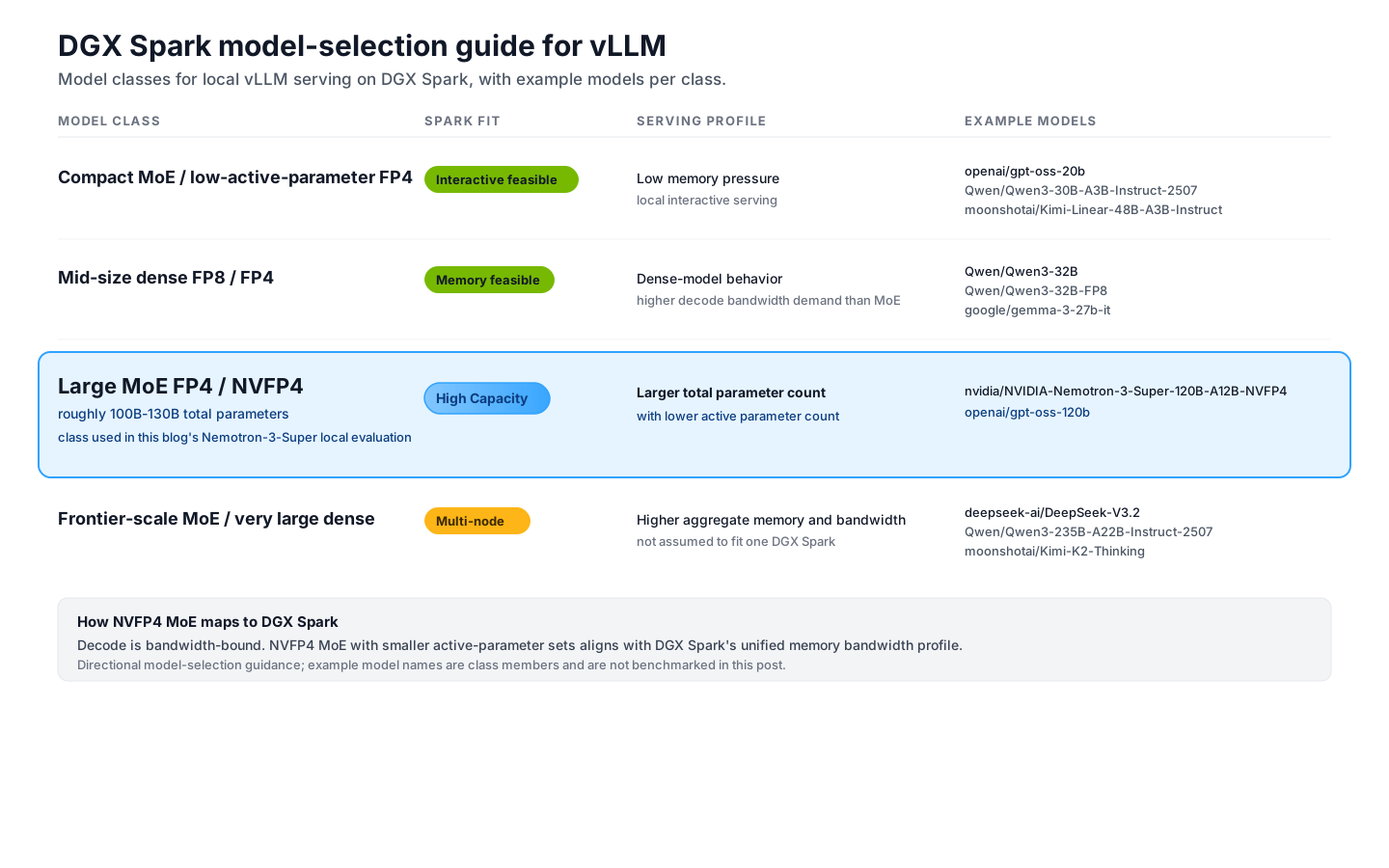
Nemotron-3-Super-120B-A12B-NVFP4 is the concrete working example below because it is a well-matched NVFP4 MoE model for Spark. For other Spark-sized NVFP4 MoE models, keep the same serving principles but start from that model's recipe.
Pre-staging the weights
Avoid making the first vllm serve invocation also perform a large model download. A more predictable pattern is to pre-stage weights once into a host-mounted Hugging Face cache, then mount the same cache into the long-running container. Model-specific download and launch examples belong in vLLM Recipes; the principle for Spark is "download once, mount everywhere."
Flags that matter for vllm serve
The example command uses vllm serve nvidia/NVIDIA-Nemotron-3-Super-120B-A12B-NVFP4 plus the flags below.
--gpu-memory-utilization. The fraction of GPU-visible memory vLLM is allowed to claim. On Spark this is a fraction of the unified pool, so the setting should leave room for the operating system, kernel page cache, container runtime, KV cache growth, and any other process touching that same memory. Start from the model recipe, then tune based on observed memory headroom and workload concurrency.
--max-model-len 131072. The maximum prompt + completion length accepted by the server. 131K is required in modern inference serving because system prompts, tool schemas, files, and history can easily exceed 20K tokens. You can raise this toward the model's supported maximum or lower it for a constrained demo, but it should not be treated as a fixed worst-case KV reservation for every in-flight request; vLLM schedules based on the active context used by running requests.
--max-num-seqs 4. The maximum number of in-flight sequences vLLM will admit. For Nemotron NVFP4 on Spark, the current recipe keeps this low. Above four concurrent decode streams the per-token bandwidth tax can outweigh continuous-batching gains, and time-to-first-token spikes.
Automatic prefix caching. vLLM's automatic prefix caching reuses KV blocks across requests that share an opening prompt. It is enabled by default in vLLM V1, so the example below does not pass --enable-prefix-caching. It is useful for chat workloads with a long shared system prompt, but the application should remain correct even when cache hits are zero.
Tool and reasoning parser flags. vLLM can parse model-specific reasoning traces and tool-call formats into structured OpenAI-compatible response fields. On Spark, these flags should follow the model recipe rather than a hardware default: set a reasoning parser only for models that emit supported reasoning blocks, and set --enable-auto-tool-choice plus a tool-call parser only when your client needs tool calls. For current vLLM builds, Nemotron-3 models can use the built-in --reasoning-parser nemotron_v3 path; older Spark recipes may still reference the external super_v3 parser plugin.
A few flags are useful to evaluate, but they should not be copied into a demo runbook without validation. --kv-cache-dtype fp8 can reduce KV-cache memory pressure, but it may affect model predictability and can carry a noticeable performance cost on Spark for some workloads; avoid it unless memory pressure requires it and quality checks pass. --speculative-config enables speculative decoding; for Nemotron-3-Super, the relevant path is the model's MTP support. --tensor-parallel-size 2 is only meaningful if two Sparks are linked through the ConnectX-7 ports; use it for validated multi-Spark recipes rather than as a single-node tuning flag.
When to override vLLM defaults
vLLM's default heuristics are designed to select the right quantized linear, MoE, and checkpoint-loading paths for the installed version. On single-GPU DGX Spark, start with the model recipe and vLLM defaults, then add explicit overrides only when they are intentional for the exact model, image, and hardware combination you validated.
Backend selection. Leave quantized linear and MoE backend selection on auto unless your tested recipe requires a specific backend. The right FP4 path can change with vLLM release and model architecture; recent FlashInfer CUTLASS paths are much stronger than older Spark guidance suggests. If you intentionally pin a backend, prefer CLI flags such as --linear-backend and --moe-backend; older environment variables for this path are deprecated.
Version-specific workarounds. Some Spark recipes include compatibility environment variables for a specific image tag. Treat those as version-specific workarounds, not general vLLM requirements. For example, a FlashInfer allreduce backend override is not needed for a single-Spark command that does not use tensor parallelism.
Checkpoint quantization. vLLM detects checkpoint quantization from the model config. For a pre-quantized NVFP4 checkpoint, leave --quantization unset; use it only when you intentionally want vLLM to apply a quantization method at load time.
Pre-warming the JIT
Cold-start behavior depends on the model, kernels, image tag, and request path. In our Nemotron-3-Super Spark setup, the first request after vllm serve boots triggers Inductor and FlashInfer JIT codegen and can take roughly 25 seconds. Avoid sending that path to an end user. Fire a small ping from the application at startup that exercises the same client path as the real workload (same model, same chat_template_kwargs, just max_tokens=3). Once the relevant kernels are warm, the same short prompt path returns in under half a second in our setup.
Initial weight load is a separate problem from request warmup. If the 10-15 minute safetensor load time matters for your deployment, evaluate vLLM's fastsafetensors or InstantTensor loading paths against your exact model, image, and storage stack.
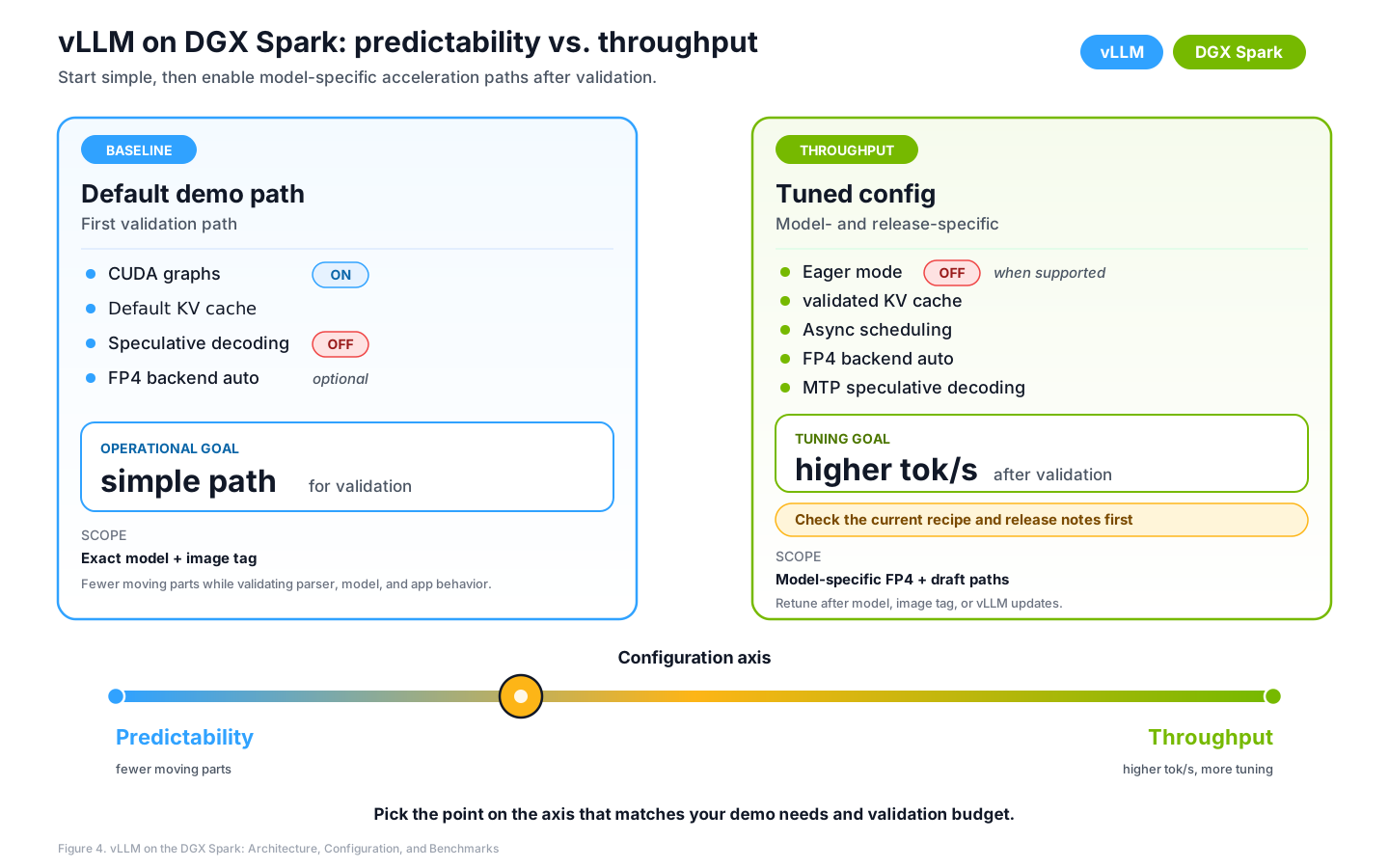
Predictability and throughput tuning
The Spark vLLM configuration can be tuned for either straightforward demo operation or maximum throughput.
For the measurements in this post, --kv-cache-dtype is unset, speculative decoding is disabled, and CUDA graphs remain enabled. Treat those as measured recipe choices for this model, image, and workload, not universal Spark defaults. Throughput-oriented runs can still evaluate FP8 KV cache, async scheduling, speculative decoding, and explicit backend selection, but those settings should be validated against the exact model, prompt shape, batch pattern, and vLLM release.
The right point depends on the workload. Here, we optimize for a public-facing demo path: predictable local serving, clear telemetry, and stable responses.
Example workload: vllm-spark-game
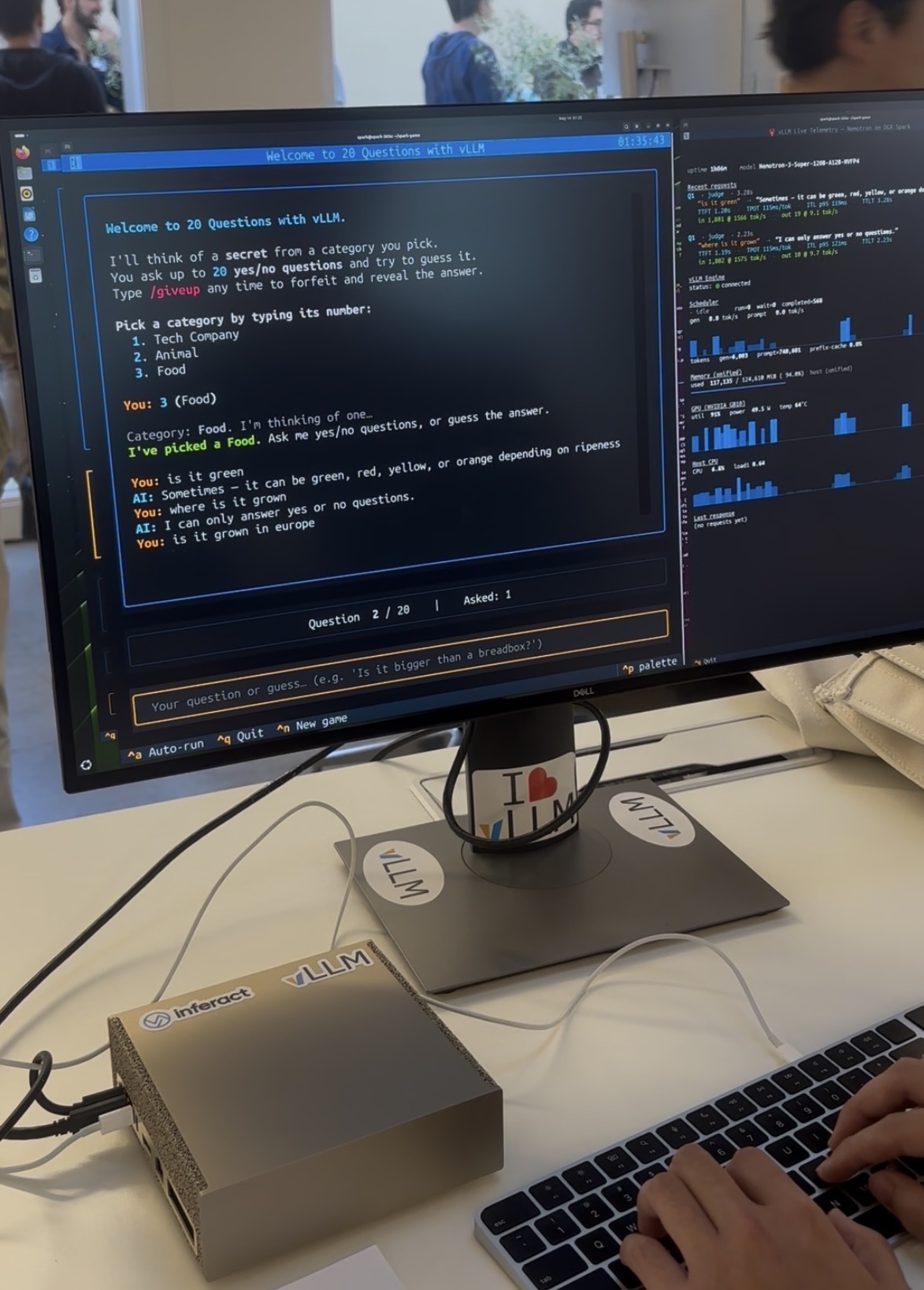
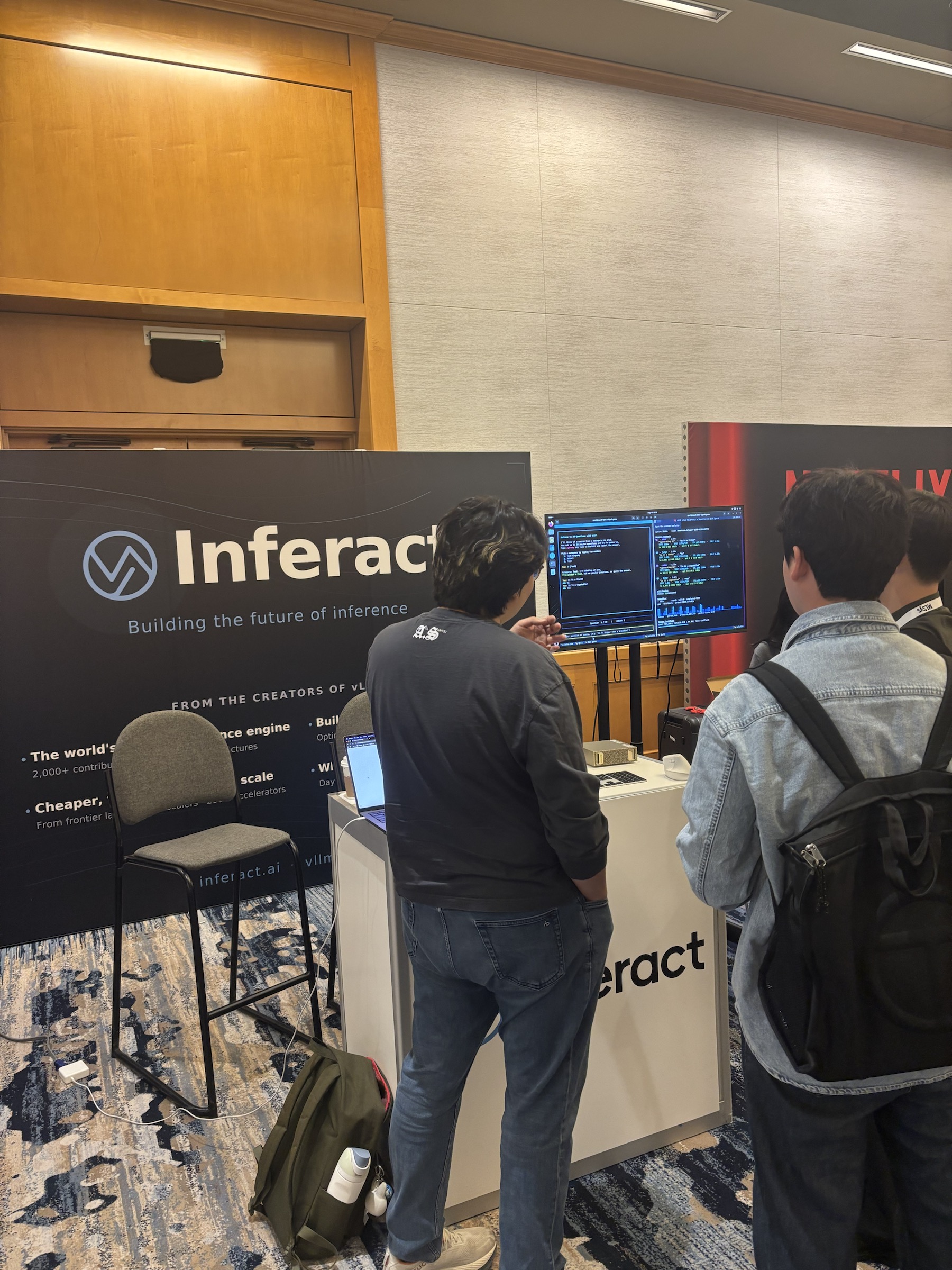
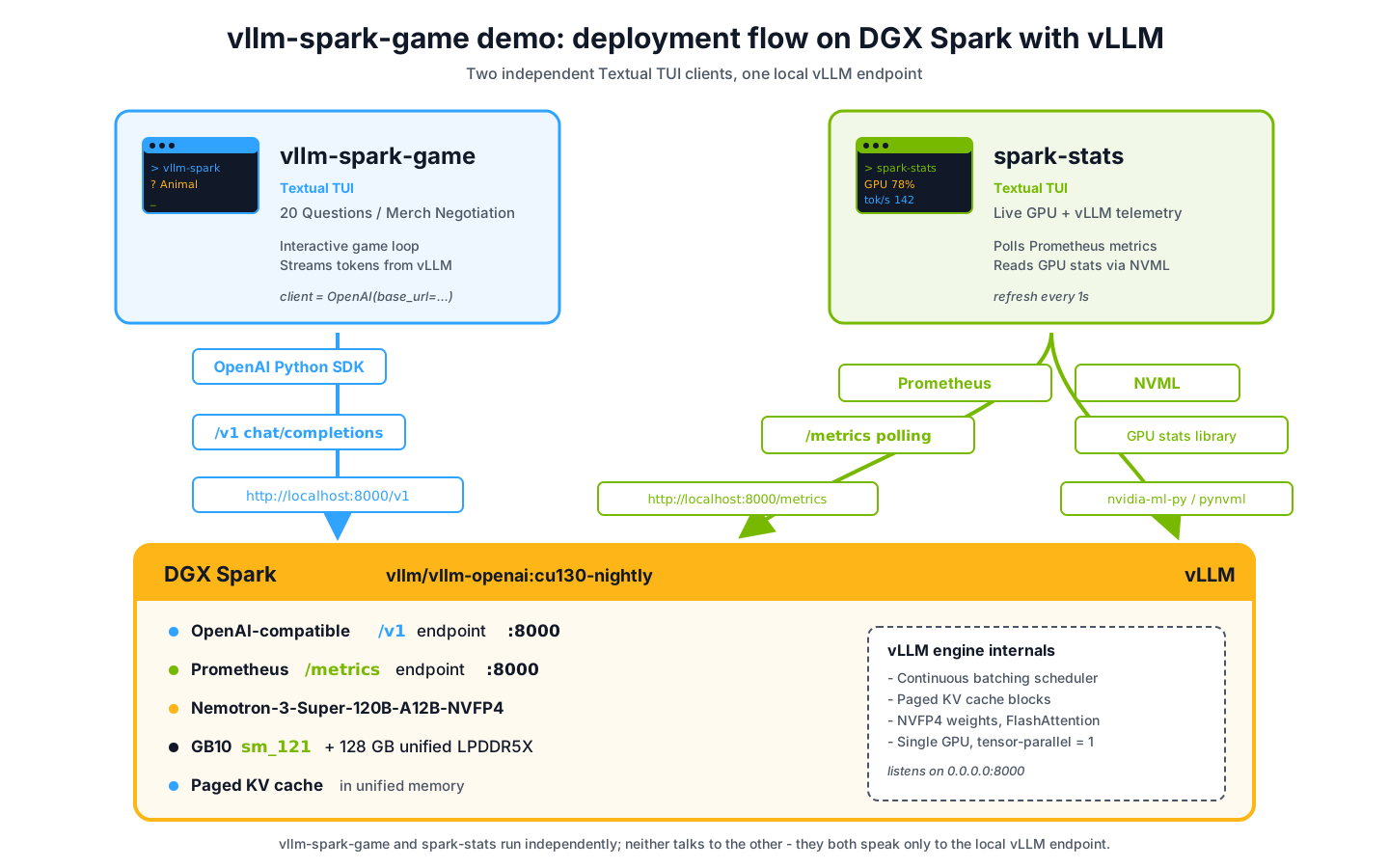
To test the configuration beyond simple curl calls, we built vllm-spark-game. The game runs a live 20-Questions interaction against the local vLLM endpoint, while a companion stats view polls vLLM and GPU telemetry from the same Spark. The point of the workload is to exercise the serving path end to end: OpenAI-compatible chat requests, streamed responses, prompt prefill, decode, KV-cache behavior, and live metrics. Source layout and run commands live in the project README.
The Docker invocation
The full Docker command for this example workload, with the host-mounted Hugging Face cache for weight reuse across restarts. The snippet keeps cu130-nightly visible as the tested compatibility track; for a reproducible deployment, replace it with the exact release tag, commit-specific nightly tag, or image digest you validated.
docker run -d --name vllm --ipc=host --restart unless-stopped \
  --gpus all -p 8000:8000 \
  -e HF_TOKEN="$HF_TOKEN" \
  -v ~/.cache/huggingface:/root/.cache/huggingface \
  vllm/vllm-openai:cu130-nightly \
  nvidia/NVIDIA-Nemotron-3-Super-120B-A12B-NVFP4 \
    --served-model-name nemotron-3-super \
    --trust-remote-code \
    --max-model-len 131072 \
    --gpu-memory-utilization 0.85 \
    --max-num-seqs 4 \
    --reasoning-parser nemotron_v3 \
    --enable-auto-tool-choice \
    --tool-call-parser qwen3_coder
First load takes 10-15 minutes in our setup with the default safetensor loading path. For deployments where startup time matters, evaluate fastsafetensors or InstantTensor before finalizing the runbook. Verify readiness with curl -sS http://localhost:8000/v1/models | jq -r '.data[0].id'; the command should return nemotron-3-super.
Deployment shape
Single-Spark evaluation results
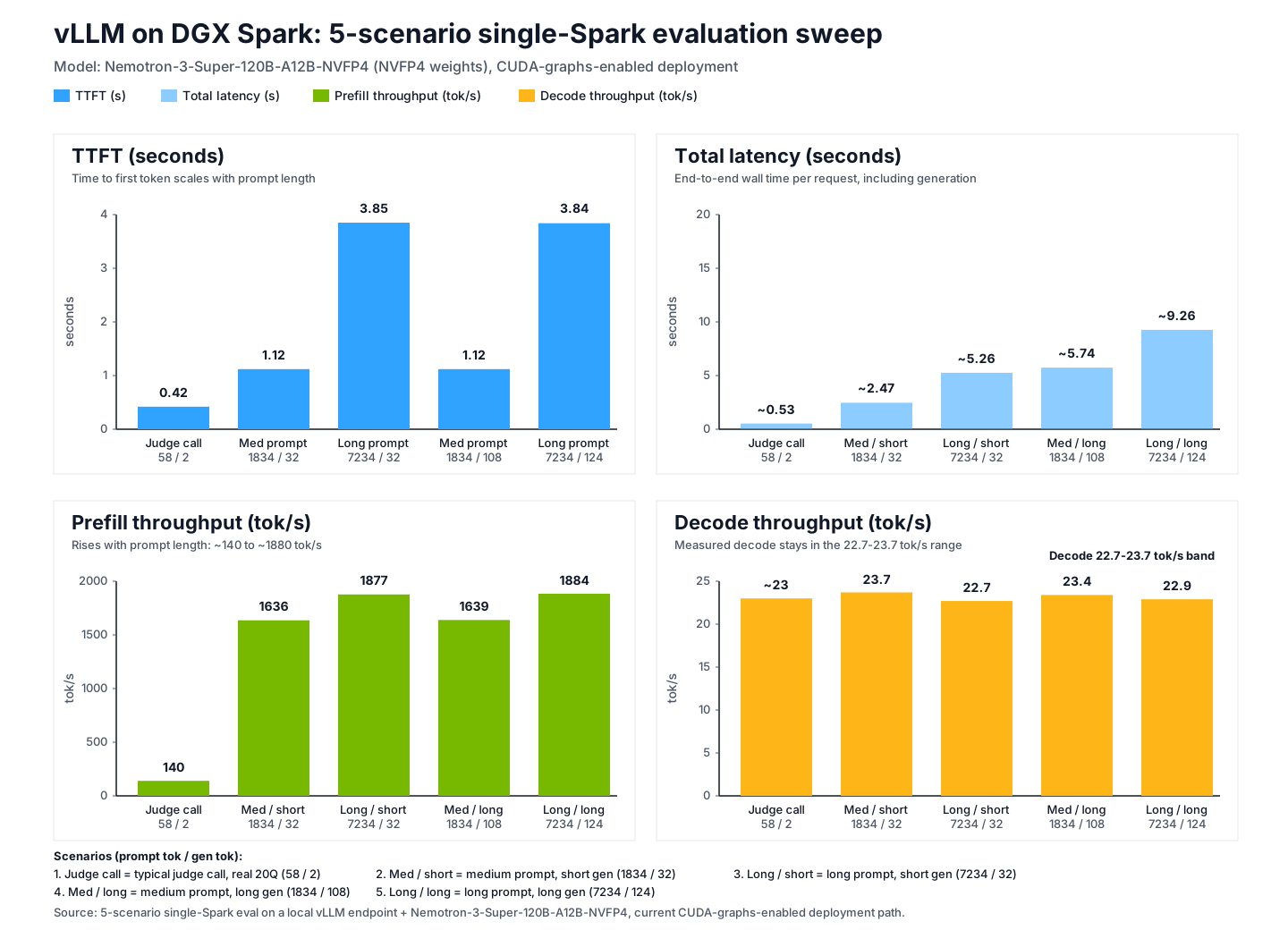
We ran an application-oriented five-scenario evaluation against a local vLLM OpenAI-compatible endpoint hosting Nemotron-3-Super-120B-A12B-NVFP4 on a single DGX Spark. These numbers are meant to make the deployment methodology concrete, not to serve as a leaderboard submission. In our updated single-Spark eval, measured decode throughput stayed in the 22.7-23.7 tok/s range across the scenarios. Each row is the median of three runs after a single warm-up call. Exact token counts come from stream_options.include_usage, not chunk counts.
| Scenario | Prompt tok | Gen tok | TTFT | Total latency | Prefill tok/s | Decode tok/s |
|---|---|---|---|---|---|---|
| typical judge call (real 20Q, noisy 2-token gen) | 58 | 2 | 0.42 s | ~0.53 s | 140 | ~23 |
| medium prompt, short gen | 1,834 | 32 | 1.12 s | ~2.47 s | 1,636 | 23.7 |
| long prompt, short gen | 7,234 | 32 | 3.85 s | ~5.26 s | 1,877 | 22.7 |
| medium prompt, long gen | 1,834 | 108 | 1.12 s | ~5.74 s | 1,639 | 23.4 |
| long prompt, long gen | 7,234 | 124 | 3.84 s | ~9.26 s | 1,884 | 22.9 |
Table 2. Five-scenario single-Spark eval on a local vLLM endpoint hosting Nemotron-3-Super-120B-A12B-NVFP4. Each row reports the median of three runs after warm-up.
Evaluation interpretation
Prefill scales near-linearly with prompt length. TTFT roughly triples when the prompt grows four times. Prefill rate climbs from 140 to nearly 1,900 tokens per second as the prompt gets large enough to amortize per-request overhead. Prefill is compute-bound and parallelizable across the full prompt, so it benefits more directly from the available tensor-core throughput.
Decode throughput stays in a narrow 22.7–23.7 tok/s band across these single-Spark eval runs. The judge call's user-facing latency matters more than its decode rate, since it generates only two tokens. Decode still depends on active parameter count, FP4 kernel path, CUDA graph behavior, and the exact vLLM image. Treat this as a recipe-specific result for Nemotron-3-Super on one DGX Spark, not a universal ceiling for DGX Spark or vLLM.
Configuration note. These measurements are specific to the image tag, context length, CUDA graph status, backend path, and scheduling settings used for the run. Report those values alongside any reproduced evaluation.
Live behavior during a game. A typical 20-Questions turn sends roughly 1,000-token prompts (system prompt + facts block + secret + question). End-to-end perceived latency remains dominated by TTFT and short decode bursts; for 5–15 output tokens, decode is roughly 0.2–0.7s within the measured 22.7–23.7 tok/s band. KV-cache utilization rarely tops two percent during play. The telemetry view shows prompt_tps spike briefly after each turn starts, then gen_tps holds within the measured 22.7–23.7 tok/s band during steady generation while the answer streams.
Operational takeaways
Picking the right model class is the first tuning decision: 100-130B MoE NVFP4 models are well matched to Spark's memory capacity and active-parameter profile, while dense models are usually less aligned with interactive local decode. An official vLLM image plus a Spark-tested recipe avoids source-build risk unless custom kernels are required. --gpu-memory-utilization should be tuned for the unified memory pool and the other processes sharing it. Pre-warming the JIT avoids sending cold-start latency to the first user request. /metrics exposes the KV-cache utilization and TTFT histograms needed to understand load behavior.
Concluding thoughts
DGX Spark is a local inference system for development, demos, and small-batch serving with a different serving profile than a data center GPU server. Its unified-memory architecture, sm_121 target, model-specific FP4 paths, and local decode characteristics make workload tuning especially important. With the right model, image tag, and runtime settings, Spark gives developers a practical way to serve large models locally while retaining a familiar production-style workflow.
vLLM is a default fit for DGX Spark because it keeps those choices at the serving layer while preserving a standard application interface. Once the model, image tag, and flags are validated, applications still get OpenAI-compatible APIs, streaming, continuous batching, paged KV cache management, and Prometheus metrics.
Written by the team at Inferact on a Spark we keep running at the office.