

Scaling Multi-GPU Video Captioning with PyNvVideoCodec and vLLM
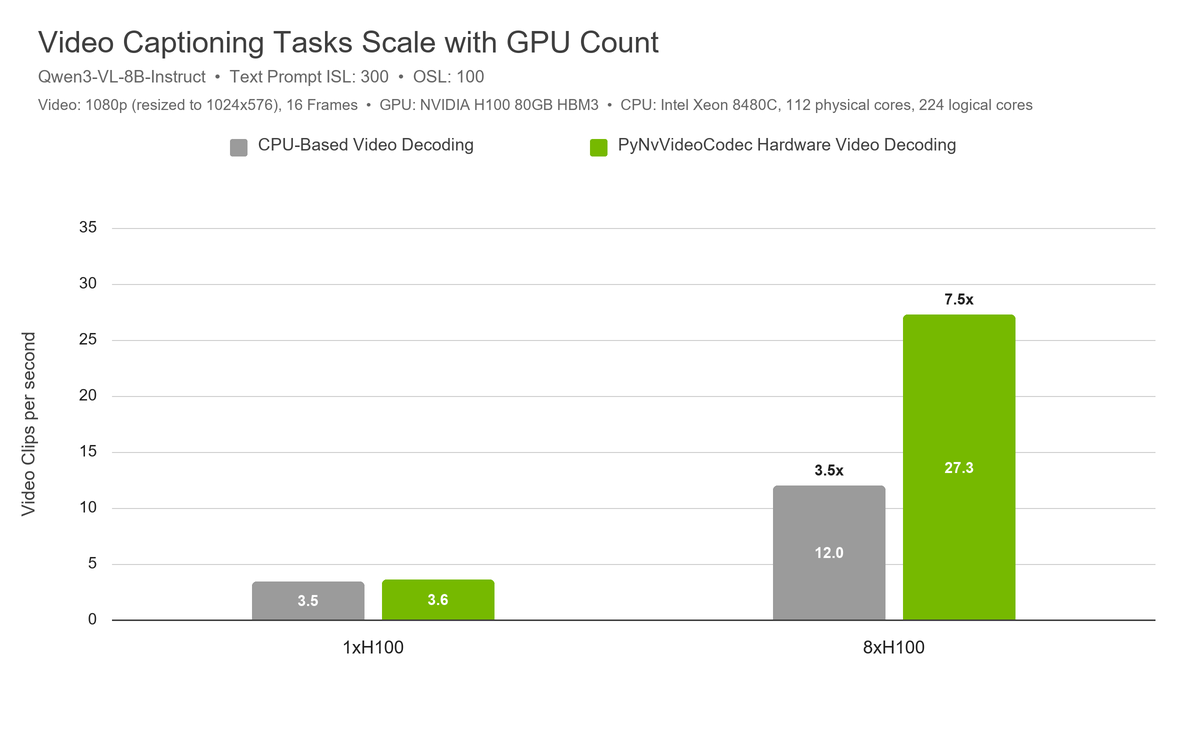
We are excited to announce support for hardware video decoding built into NVIDIA GPUs, allowing video captioning and labeling tasks previously bottlenecked by CPU to scale their throughput on datacenter-grade multi-GPU nodes.
Video captioning is a common task in many industries for describing what is taking place in a video. This enables autonomous vehicle (AV) training systems to describe and classify dangerous scenarios, to produce human-readable and searchable metadata, among other use cases.
Previously, vLLM processing of these datasets required sending videos which could only be decoded via the CPU-based OpenCV+FFMPEG backend. Running such Vision Language Models (VLMs) on multi-GPU nodes (one vLLM server per GPU) places stronger demand on the CPU to decode video frames before any VLM inference work can begin. Especially in the case of video captioning, where outputs are relatively short (100-200 tokens), the relative portion of time spent decoding videos is much larger, and CPU-based video decoding can quickly become a bottleneck, maxing out CPU cores even with just 2 or 4 GPUs.
By integrating PyNvVideoCodec, a python-based interface to NVIDIA hardware video decoders (also known as “NVDEC”), vLLM is able to shift this video decoding workload off of the CPU and remove the aforementioned bottleneck, enabling excellent scaling even up to 8 GPUs.
See the following illustrative examples of input prompt/output for this task (real prompts are more elaborate and structured):
Example input prompt
Analyze this front-facing dashcam video. Briefly describe the driving environment, relevant road users and traffic controls, and the ego vehicle’s actions. Report only clearly visible details and avoid speculation.
Example output
The ego vehicle travels along a multi-lane urban road in daylight with clear visibility. Several vehicles are ahead in the same and adjacent lanes, and a signalized intersection is visible. The ego vehicle maintains its lane, slows as it approaches traffic, and continues while keeping distance from the vehicle ahead.
Using NVIDIA Hardware Video Decoding in vLLM
Install pre-requisites
The functionality provided by PyNvVideoCodec is already included with the standard CUDA vLLM releases! For anyone using a custom installation of vLLM, ensure your project includes a PyPi dependency on PyNvVideoCodec==2.0.4.
Start vLLM with PyNvVideoCodec Video Decoder Enabled
# First launch CUDA MPS Daemon
nvidia-cuda-mps-control -d

# Launch vLLM with pynvvideocodec video backend
vllm serve Qwen/Qwen3-VL-8B-Instruct \
  --dtype bfloat16 \
  --max-model-len 32768 \
  --max-num-seqs 1024 \
  --max-num-batched-tokens 32768 \
  --api-server-count 4 \
  --renderer-num-workers 4 \
  --async-scheduling \
  --mm-ipc-gpu-memory-gb 2 \
  --media-io-kwargs \    '{"video":{"backend":"pynvvideocodec","min_frames":16,"max_frames":16,"hw_decoders":2}}' \
  --mm-processor-kwargs \
    '{"size":{"shortest_edge":65536,"longest_edge":9437184}}'
CUDA MPS is essential for good performance with multi-process high concurrency work such as bulk VLM inference. Before vllm serve, we recommend to ensure the MPS Daemon is started.
--mm-ipc-gpu-memory-gb is used to reserve VRAM for video decoding. You can test throughput at various values and only reserve the least amount which doesn’t impact your throughput. For additional documentation on parameters related to the PyNvVideoCodec decoder backend, please see the relevant vLLM documentation.
Scaling to multiple GPUs, we typically recommend running one container per vLLM server replica and exposing a single GPU to each container. Alternatively, use CUDA_VISIBLE_DEVICES to expose a single GPU to each vLLM replica. We use a reverse proxy to distribute requests among the vLLM replicas.
Multi-GPU Scaling in Video Captioning Tasks
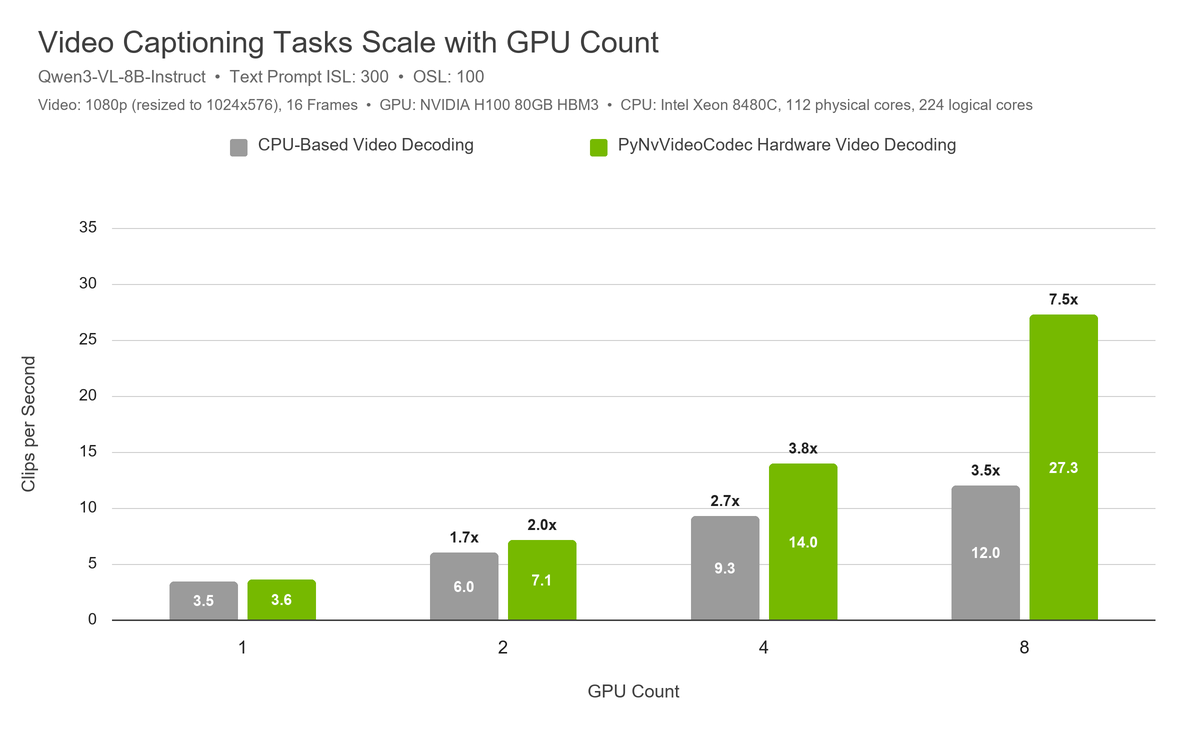
Figure 1: Improved Multi-GPU Scaling with H100 GPUs. At 8xH100, GPU-based video decoding provides more than double the throughput compared to the CPU-based video decoder. 8 vLLM replicas, each with a single GPU.
As an example of the benefits of this method, we look at the task of video captioning utilized within NVIDIA AV organizations. These systems are responsible for captioning hundreds of thousands of hours of video clips, comprising hundreds of millions of video captioning requests. These tasks often require relatively lightweight models (e.g. Qwen/Qwen3-VL-8B-Instruct), have an input prompt specifying the type of desired description, and have outputs on the order of 100-200 tokens.
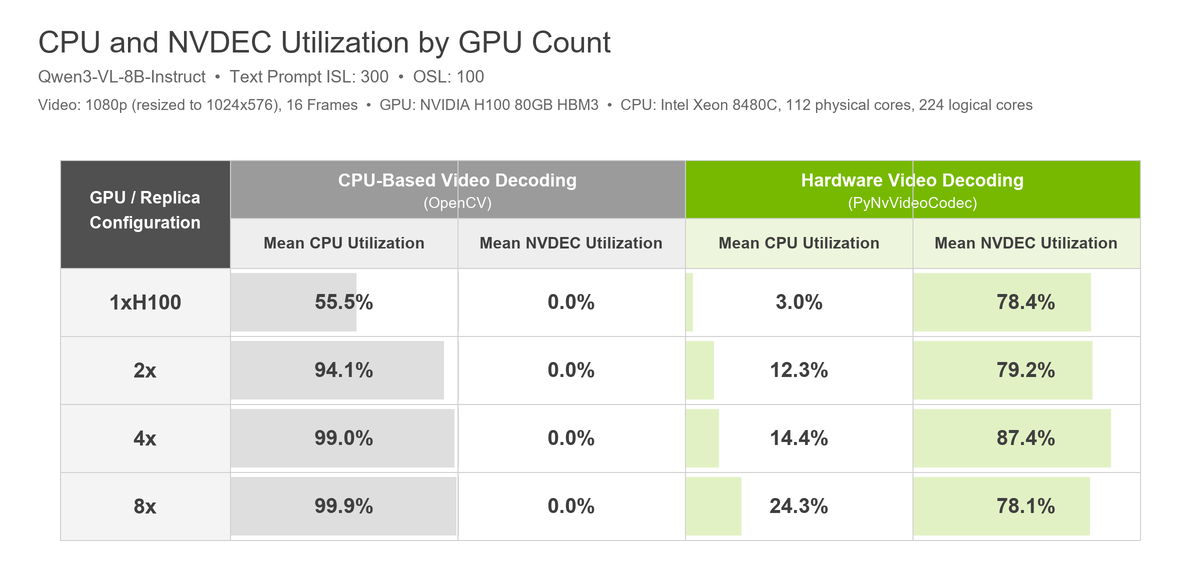
Figure 2. Large workloads utilizing up to 8 GPUs previously would bottleneck on CPU utilization before 4 GPUs. Now, with hardware-based video decoding support the CPU bottleneck has been removed. Data captured during benchmark steady-state.
Caveats
It is worth noting that video decoding does require some VRAM to be set aside: If your use case utilizes all of your KV cache already using your entire VRAM, there is a chance you may see some impact. In actual testing, we have not seen a case where utilizing PyNvVideoCodec has a performance downside.
Acknowledgement
Thanks to everyone who contributed to bringing support for hardware video decoding to vLLM.
- NVIDIA:
- NVCV Team: Brandon Pelfrey, Benjamin Chislett, Dhaval Suthar, Jeremy Bottleson, Ernesto Zamora Ramos, David Lesage
- PyNvVideoCodec Team: Rohit Naskulwar, Jayant Mukundam, Hareshkumar Borse
- vLLM team and community: Roger Wang, Nick Hill, Cyrus Leung, Zifeng Mo